

10+ Best anatomy apps in 2027

Share:

Copy link

Share via Telegram

Share on Facebook

Share on LinkedIn

Share via WhatsApp

Share on X

Share via Email

Table of contents
Anatomy apps offer a more interactive way to study the human body. Depending on the app, you can explore 3D models, review specific structures, test your knowledge with quizzes, or use AR to study anatomy from a different perspective.
With so many anatomy apps available, choosing the right one can be difficult. We compared 15 anatomy apps based on their features, learning tools, platform availability, pricing, and user ratings to help medical students and interns find the one that suits their needs. You will also find a breakdown of yearly costs and a combined rating across Google Play and the App Store.
Top anatomy apps in 2027
If you're short on time and don't want to scroll through detailed reviews, this quick comparison table gives you a snapshot of the 15 best anatomy apps in 2027.
Ratings reflect the Google Play and App Store at the time of our review; prices were checked on October 22, 2026.
Yearly cost at a glance
App prices come in different formats: monthly, quarterly, and yearly subscriptions, one-time purchases, and in-app upgrades. To compare them, we calculated the cheapest way to get one full year of access to each app.
Prices in USD for the US stores and official websites as of October 22, 2026; they may vary by region and change during promotions.
How users rate these apps: both stores combined
Most apps have two ratings, one on Google Play and one on the App Store, and they can differ a lot. To get one comparable score, we combined both ratings, weighting each by its number of reviews.
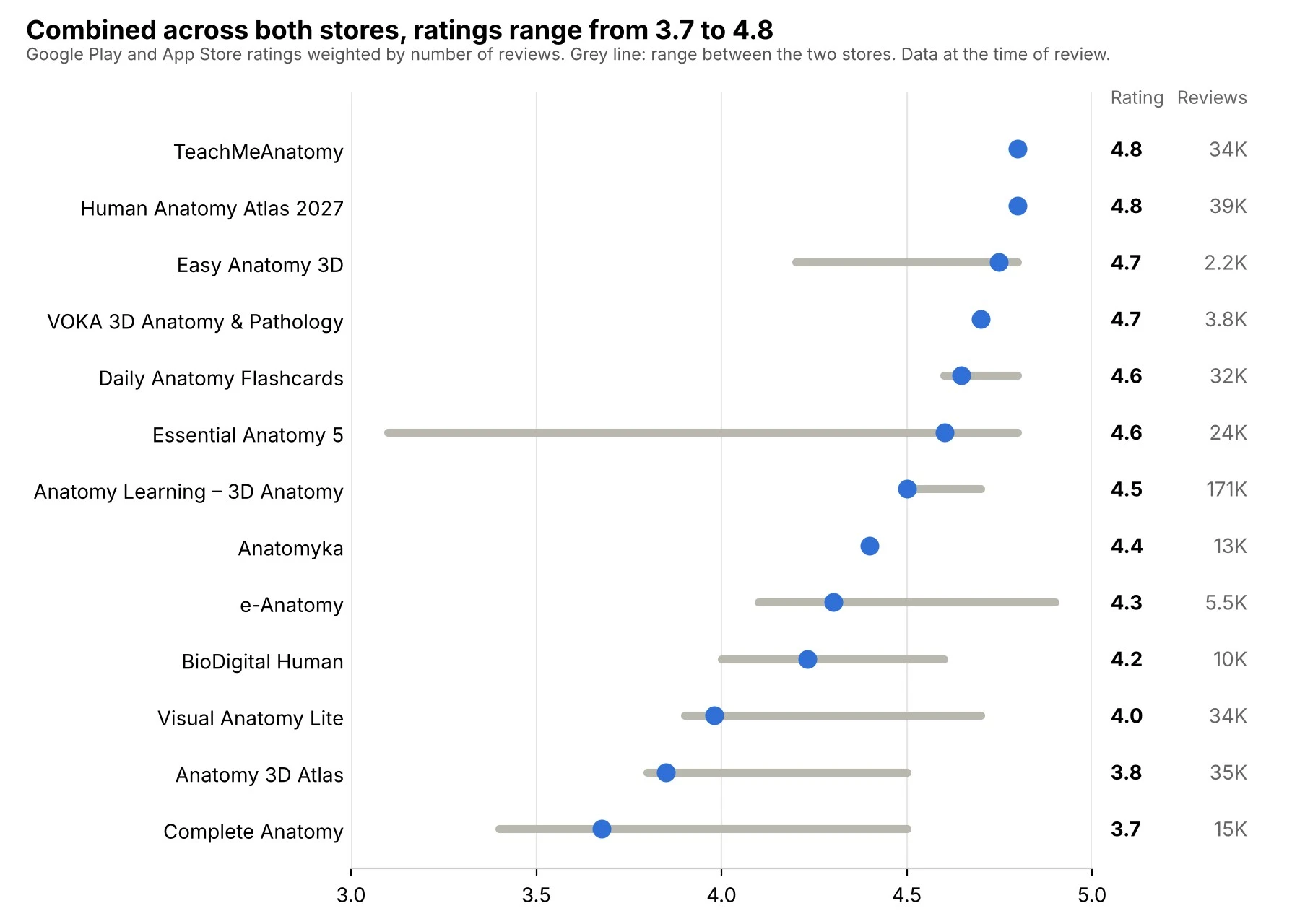
How we calculated it: combined rating = (Google Play rating × Google Play reviews + App Store rating × App Store reviews) / total reviews. Kenhub and Anatomy.app are not included because they are web platforms without store ratings.
TeachMeAnatomy and Human Anatomy Atlas 2027 lead with 4.8. Complete Anatomy comes last with 3.7: it has 4.5 stars on the App Store but 3.4 on Google Play.
The largest gaps between the stores are for Essential Anatomy 5, Complete Anatomy, and e-Anatomy. If an app's ratings differ this much, check the rating and recent reviews for your own platform before you buy. In the reviews summarized below, users mention crashes after updates and login issues on some devices.
Some scores rely mostly on one store: Easy Anatomy 3D has only 187 reviews on Google Play, so its combined rating is driven by the App Store, while Anatomyka has only 87 ratings on the App Store, so its score is driven by Google Play.
How we evaluated the apps
To make the comparison easier, we looked at the key features students typically consider when choosing an anatomy app.
-
Ease of use. A clear interface makes it easier to find structures and use the app's main learning tools. We looked at navigation, search, and the overall ease of use for both beginners and more experienced learners.
-
Anatomical content. The comparison covers the range and level of anatomical detail available in each app, including the quality of labels, structures, and supporting medical information.
-
Interactive features. We compared the interactive tools available in each app, including 3D models that can be rotated, zoomed, or dissected, quizzes, AR features, and annotation tools.
-
Compatibility. The list includes apps for iOS, Android, web, Windows, and macOS. Where relevant, we also looked at whether the same content can be used across devices.
-
Pricing. We compared current prices, free features, subscriptions, one-time purchases, and available plans for students or institutions.
-
User ratings. We also looked at user ratings and review counts on the App Store and Google Play, and combined them into one score weighted by the number of reviews (see the formula above). Prices were checked on October 22, 2026. Because ratings and prices can change, the figures in this article reflect the information available when we reviewed the apps.
VOKA 3D Anatomy & Pathology is our own product. We reviewed it by the same criteria as the other apps and listed its limitations.
Best anatomy app for medical students
For medical students, the best anatomy apps should combine detailed anatomical references with interactive tools for studying and exam preparation. VOKA 3D Anatomy & Pathology, Complete Anatomy, TeachMeAnatomy, BioDigital Human, and Anatomy Learning – 3D Anatomy offer different approaches to support these needs.
VOKA 3D Anatomy & Pathology
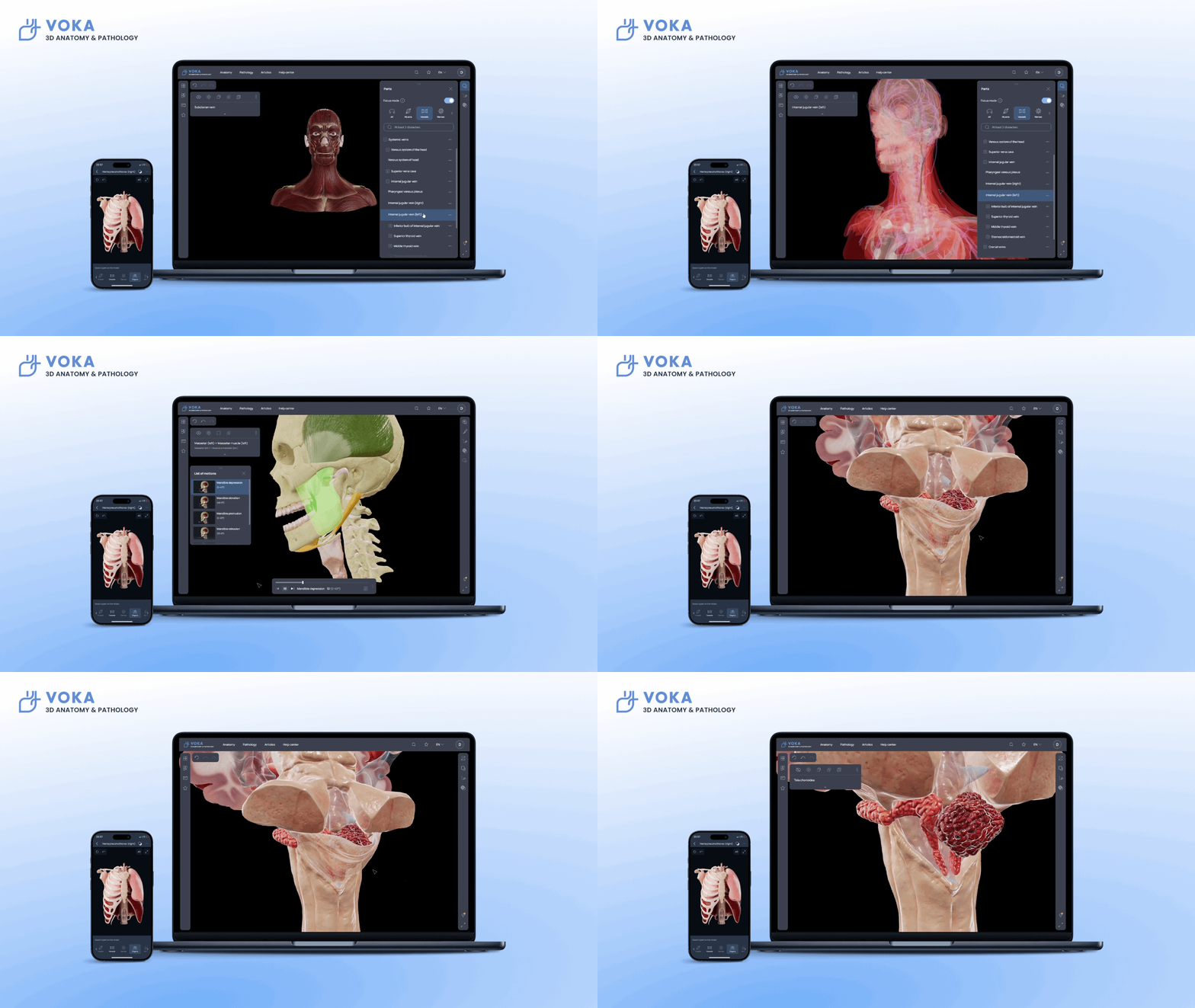
Best for: studying normal anatomy and pathology side by side in 3D.
VOKA 3D Anatomy & Pathology is a 3D anatomy atlas that brings together 1,100+ 3D models, covering normal anatomy, microanatomy, embryology, biomechanics, and gross pathology.
With a set of interactive tools, users can rotate and zoom models, isolate, hide, or fade structures, and explore different anatomical layers. The app also includes virtual dissection and an AR mode that lets users place 3D models in their physical environment.
The VOKA app is available on the App Store, Google Play, and Huawei AppGallery, and on the web in 6 languages: English, German, Spanish, French, Portuguese, and Russian, with more localizations in progress.
Highlights
Limitations
Compatibility
Pricing
Reviews
Explore the human body in 3D with VOKA
Try the appComplete Anatomy

Best for: in-depth 3D dissection with courses and videos.
Complete Anatomy by 3D4Medical from Elsevier is a 3D anatomy platform for medical students, educators, and healthcare professionals. Alongside detailed male and female anatomy models, it offers interactive dissection, clinical content, courses, and assessment tools. The platform supports layer-by-layer exploration and detailed views of individual structures, with licensed content from Gray's Anatomy also included. It also includes 1,500+ clinical videos, microscopic anatomy models, and radiology images such as CT and MRI.
Highlights
Limitations
Compatibility
Pricing
Reviews
TeachMeAnatomy

Best for: exam revision with articles and a question bank.
TeachMeAnatomy by TeachMeSeries combines anatomy articles, illustrations, interactive 3D models, and quizzes in one learning platform. The app and website also cover regional anatomy and clinical topics, making it suitable for medical students and healthcare professionals.
The platform supports offline access to articles, illustrations, and quizzes. Premium access adds bespoke 3D models, an anatomy question bank, progress tracking, and a custom quiz builder.
Highlights
Limitations
Compatibility
Pricing
Note
Reviews
BioDigital Human

Best for: exploring health conditions and treatments in 3D.
BioDigital Human is an interactive 3D platform covering anatomy, physiology, health conditions, and treatments. Its Human Library contains 700+ interactive 3D models, including more than 600 health condition models and treatment visualizations.
Beyond model exploration, the platform provides tools for isolating structures, adding labels and drawings, and creating custom tours and quizzes with Human Studio. It is available in 8 languages.
Highlights
Limitations
Compatibility
Pricing
Reviews
Anatomy Learning - 3D Anatomy

Best for: free 3D exploration with cross-sections.
Anatomy Learning - 3D Anatomy by 3DMedical is an interactive 3D anatomy atlas with 6,000+ labeled anatomical points. Users can rotate and zoom models, remove structures to explore deeper layers, and switch individual anatomical systems on or off. The app also includes interactive muscle and joint animations, cross-sectional anatomy, and 500+ labeled quizzes for self-testing.
Highlights
Limitations
Compatibility
Pricing
Reviews
Best free anatomy apps
The best free anatomy apps let you study anatomical structures and test your knowledge without paying for a subscription. Daily Anatomy Flashcards focuses on memorization and spaced repetition, while Visual Anatomy Lite combines labeled anatomical references with interactive 3D models, animations, and quizzes.
Daily Anatomy Flashcards

Best for: beginners memorizing key structures daily.
Daily Anatomy Flashcards is a free anatomy learning app from Kenhub focused on 500 of the most important anatomical structures. Designed for beginners, it starts with basic structures and gradually increases the difficulty. The app uses different question formats and built-in spaced repetition to help learners review material at increasing intervals. Structures are highlighted in green, making their shape and location easier to identify.
Highlights
Limitations
Compatibility
Pricing
Reviews
Visual Anatomy Lite

Best for: a quick free reference with audio pronunciation.
Visual Anatomy Lite by Education Mobile is a free interactive anatomy reference covering the major body systems, with 350+ selectable anatomical feature points. The app combines labeled anatomy images with a rotating 3D organ model, muscle-action animations, audio pronunciation, and a search tool for finding anatomical structures. It also includes a 23-question multiple-choice quiz for self-testing.
Highlights
Limitations
Compatibility
Pricing
Reviews
Best web-based anatomy platforms
Web-based anatomy platforms run in a browser, so there is nothing to install: you can use them on any device, including a university laptop. Kenhub and Anatomy.app are built as web platforms. Several apps from this list also have a web version alongside their mobile apps, including VOKA 3D Anatomy & Pathology, BioDigital Human, TeachMeAnatomy, and e-Anatomy.
Kenhub
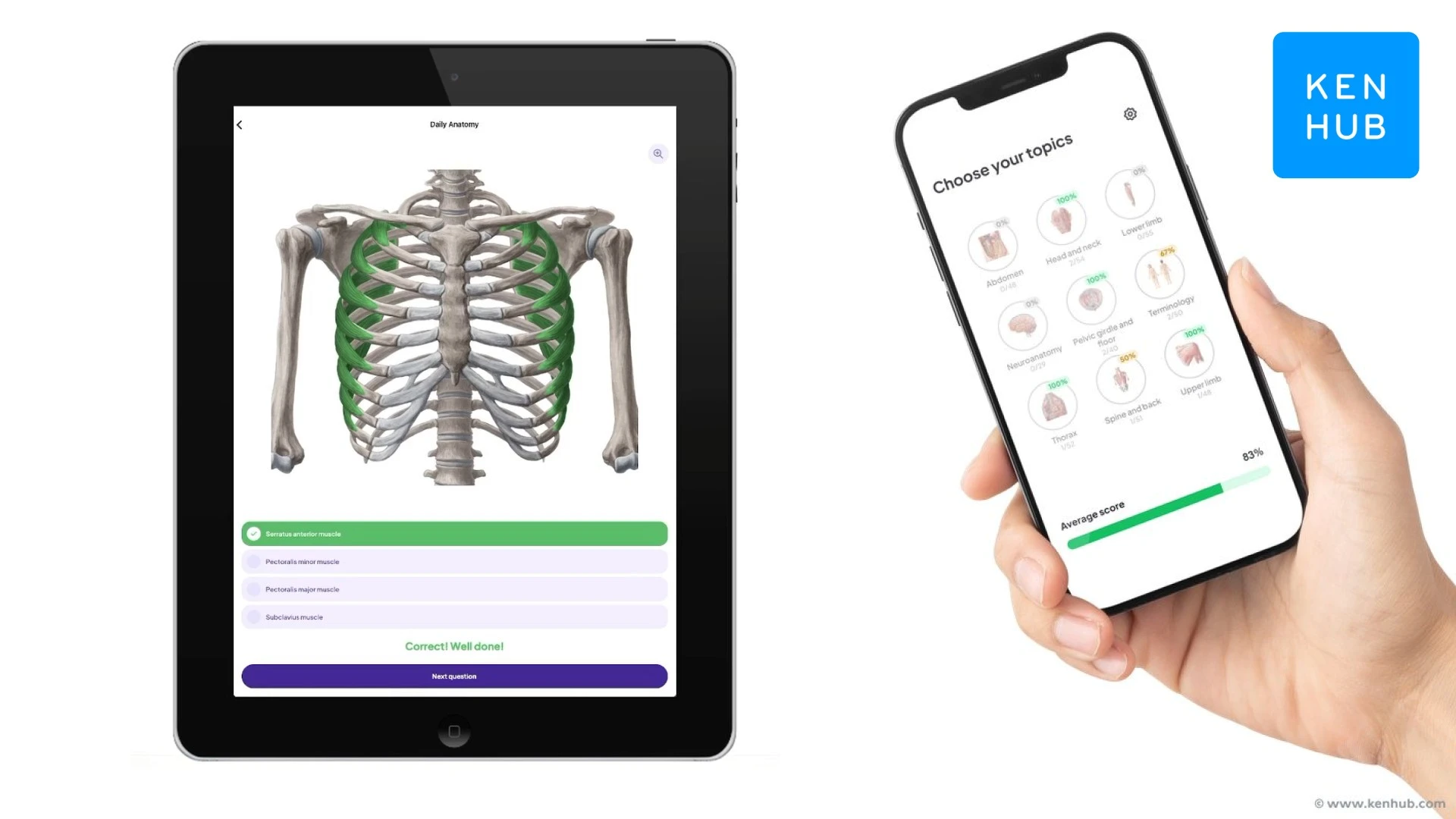
Best for: structured exam prep with videos and spaced repetition.
Kenhub is a web-based anatomy learning platform that combines an illustrated atlas, articles, 141+ hours of video tutorials, and 485+ quizzes from beginner to advanced level. Its study tools use spaced repetition, and anatomical terms can be switched between English and Latin. Kenhub has no separate app for the full platform: the website is mobile-friendly and can be added to the home screen. The same team also makes Daily Anatomy Flashcards.
Highlights
Limitations
Compatibility
Pricing
Reviews
Anatomy.app
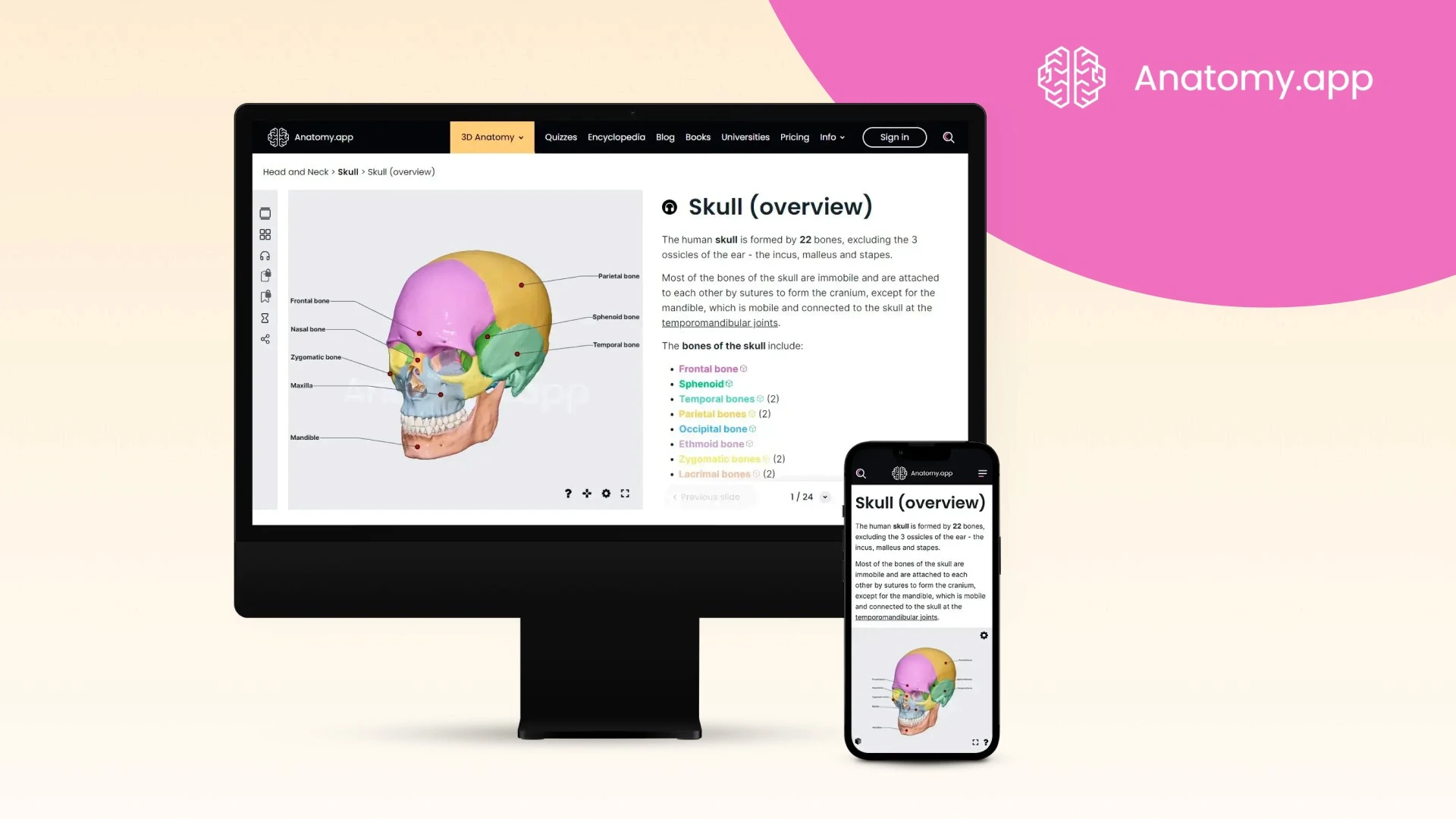
Best for: browser-based 3D study without installing an app.
Anatomy.app is a browser-based anatomy platform that combines 3D models, 3D articles, audio, quizzes, and an encyclopedia. Content is organized into 9 body regions and 10 organ systems, and Premium users get an AI assistant. Plans are available for individual learners, educators, and content creators.
Highlights
Limitations
Compatibility
Pricing
Reviews
Best anatomy apps for advanced study
The best anatomy apps for advanced study offer detailed anatomical models, comprehensive reference materials, and specialized tools for exploring the human body. For example, Human Anatomy Atlas 2027 and Anatomyka provide extensive anatomical content, while e-Anatomy focuses on medical imaging. These apps are useful for users who need more detail than a basic anatomy reference can provide.
Human Anatomy Atlas 2027
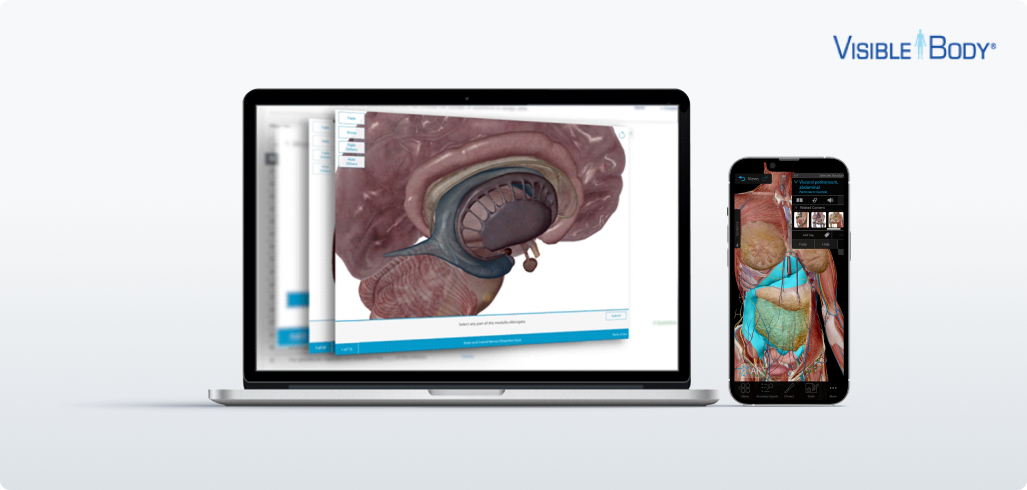
Best for: a one-time purchase atlas with lab activities.
Human Anatomy Atlas 2027 by Visible Body offers interactive 3D models of male and female anatomy, along with selected microanatomy models and animations. It also includes free lab activities, 3D dissection quizzes, and tools for creating interactive 3D presentations. The app offers additional patient education animations and 3D dental anatomy as in-app purchases.
Users can explore and dissect anatomical models on screen, in AR, and in cross-sections. Models can also be labeled with tags, notes, and 3D drawings.
Highlights
Limitations
Compatibility
Pricing
Reviews
Easy Anatomy 3D

Best for: flashcard-based review with a 3D atlas.
Easy Anatomy 3D by Easy Anatomy FZCO combines a 3D anatomy atlas, flashcards, study notes, quizzes, and anatomy videos in one learning app. Beyond the 3D atlas, Easy Anatomy includes 16,000+ illustrated flashcards, 500+ expert study notes, and video lessons. The app also offers daily review with spaced repetition, 3D quizzes, and muscle and movement animations. On supported Apple devices, a Voice AI Tutor can answer anatomy questions and interact with the 3D atlas.
Highlights
Limitations
Compatibility
Pricing
Reviews
Anatomyka

Best for: a detailed reference with vascular supply and innervation.
Anatomyka by Woodoo Art is a 3D anatomy atlas with 13,500+ organs, structures, and regions, plus 550 pages of medical descriptions. Its content is organized hierarchically, with detailed information on individual structures, anatomical regions, vascular supply, and innervation. The platform also includes clinical notes, cross-sections, labeling tools, and a simplified learning mode for students.
Highlights
Limitations
Compatibility
Pricing
Reviews
e-Anatomy
Best for: radiology and cross-sectional imaging (CT, MRI).
IMAIOS e-Anatomy is an anatomy and medical imaging atlas designed for physicians, radiologists, medical students, and radiology technicians. The library covers 26,000+ images and more than 967,000 translated medical labels, with detailed images across multiple imaging modalities, including CT, MRI, radiographs, anatomical diagrams, and nuclear imaging. Content is available in 12 languages, including Latin.
Highlights
Limitations
Compatibility
Pricing
Reviews
Essential Anatomy 5

Best for: an affordable one-time 3D reference.
Essential Anatomy 5 by 3D4Medical from Elsevier is a 3D anatomy reference with 8,200+ anatomical structures across 11 body systems, including the skeletal, muscular, nervous, cardiovascular, respiratory, digestive, and urogenital systems. The app combines detailed 3D models with structure labels, definitions, search in English and Latin, and interactive tools for isolating, hiding, fading, and slicing structures.
It also includes dynamic quizzes, bookmarks, notes, and pins that can be placed on 3D models for study and reference.
Highlights
Limitations
Compatibility
Pricing
Reviews
Anatomy 3D Atlas

Best for: bilingual terminology study in 11 languages.
Anatomy 3D Atlas by Catfish Animation Studio is an interactive 3D anatomy reference covering the major body systems, including the musculoskeletal, cardiovascular, nervous, respiratory, digestive, urogenital, endocrine, lymphatic, and eye and ear systems.
The app includes tools for hiding, isolating, filtering, and making structures transparent, as well as search and bookmarks for navigating the models. Anatomical terms and the interface are available in 11 languages, with two languages displayed simultaneously.
Highlights
Limitations
Compatibility
Pricing
Reviews
Why use anatomy apps?
Anatomy apps can make it easier to explore 3D structures, review key concepts, test your knowledge, and study anatomy outside the classroom. Depending on the app, they can complement textbooks, lectures, and other traditional study materials with interactive models and self-testing tools.
Here are some of the main ways anatomy apps can support anatomy learning:
-
Explore anatomy in 3D: Rotate, zoom, isolate, hide, or dissect anatomical structures to understand their shape, position, and relationships with surrounding tissues.
-
Focus on specific topics: Many apps let you select individual body systems, regions, or structures, so you can focus on the anatomy you need to review.
-
Study and review anywhere: Mobile anatomy apps let you access models, quizzes, flashcards, and reference materials at home, in class, or while studying on the go.
-
Test your knowledge: Quizzes, flashcards, and other self-testing tools can help you review anatomical terminology and identify structures before exams. Some apps also offer progress tracking or spaced repetition.
How to study anatomy with apps
Rotating a 3D model helps you recognize a structure, but an exam asks you to name and find it on your own. That is why the most useful study routine pairs with recalling: explore a region in 3D, then test yourself on the same region right away.
-
Look, then recall. After exploring a region in a 3D atlas, switch to a quiz or flashcards for the same structures. Many apps in this list combine both, including TeachMeAnatomy, Easy Anatomy 3D, and Human Anatomy Atlas 2027.
-
Review a little every day. Spaced repetition brings structures back at increasing intervals, so short daily sessions replace last-minute cramming. Daily Anatomy Flashcards, Easy Anatomy 3D, and Kenhub are built around this approach.
-
Combine tools. A 3D atlas helps you understand shape and position, while flashcards help you remember names. For example, pair Complete Anatomy or VOKA with Daily Anatomy Flashcards, or Anatomy Learning with Kenhub quizzes.
-
Study one region at a time. Link each structure to its function and clinical relevance. Seeing normal anatomy next to its pathology, as in VOKA or BioDigital Human, helps connect anatomy to the conditions you will meet in clinical courses.
How to choose an anatomy app
The best anatomy app depends on what you need it for. Start with your main task, then check the content each app covers and the devices you will use.
What anatomy each app covers
Most comparisons focus on study tools. This table shows the content and access options each app lists in its official description.
✓ means the feature is stated in the app's store listing or on its official website. An empty cell means it isn't mentioned there, not necessarily that it's missing. For BioDigital Human, AR is available on paid organizational plans.
Only 2 of the 15 apps, VOKA and BioDigital Human, list pathology or health condition models, and only VOKA lists embryology.
Phone, tablet, or computer?
Flashcard and quiz apps work well on a phone. For 3D dissection, a tablet or computer gives you more room to rotate models and peel back layers. If you only have a Windows laptop, choose a web platform (VOKA web, Kenhub, Anatomy.app, BioDigital Human) or an app with a desktop version (Complete Anatomy, Anatomyka, Anatomy 3D Atlas).
Future trends in anatomy apps
As technology advances, anatomy learning is becoming more immersive, intelligent, and collaborative than ever before. Here's a closer look at what the near future holds for anatomy apps:
AR and VR anatomy learning
AR and VR can make 3D anatomy more interactive by placing anatomical models in a user's physical environment or creating immersive virtual learning spaces. Several apps in this list already offer AR, including VOKA, Complete Anatomy, and Human Anatomy Atlas 2027, while BioDigital Human offers AR/VR features on organizational plans for educational institutions. Similar 3D visualization technologies are also used to represent complex biotechnology processes that are difficult to observe directly.
AI-assisted anatomy learning
AI tutors are starting to appear in anatomy apps. Easy Anatomy 3D offers a Voice AI Tutor that answers questions and interacts with the 3D atlas on supported Apple devices, and Anatomy.app gives Premium users an AI assistant. Such tools can explain difficult topics and help you spot weak areas.
Cloud-based and collaborative learning
Cloud-based platforms let you use the same 3D models and materials across devices, and some support shared annotations, presentations, and quizzes. For medical schools, this makes it easier to use the same digital anatomy resources in classrooms, labs, and remote learning environments.
Final thoughts on anatomy apps
The best anatomy app depends on what you need it for. Use the table in "How to choose an anatomy app" to match your goal with the right tools, and compare yearly costs and combined ratings before you pay. Many students get the best results by pairing a 3D atlas with a flashcard or quiz app.
FAQ
1. What is the best anatomy app?
There is no single best anatomy app: the right choice depends on your goal. For exam preparation, consider TeachMeAnatomy or Kenhub; for dissection, Complete Anatomy or Human Anatomy Atlas 2027; for radiology, e-Anatomy; and for pathology, VOKA or BioDigital Human. By combined store rating, TeachMeAnatomy and Human Anatomy Atlas 2027 (4.8) lead this list.
2. Which anatomy app is best for medical students?
Complete Anatomy, TeachMeAnatomy, VOKA 3D Anatomy & Pathology, BioDigital Human, Anatomy Learning, and Kenhub cover most medical school needs. Complete Anatomy and VOKA focus on 3D dissection and pathology, TeachMeAnatomy and Kenhub on exam revision, and Anatomy Learning on free 3D exploration.
3. What are the best free anatomy apps?
Several apps in this comparison offer free access or a free version, including VOKA 3D Anatomy & Pathology, Visual Anatomy Lite, Daily Anatomy Flashcards, Anatomy Learning, BioDigital Human, and Kenhub (free account). The amount of content and available features varies between apps, so check what is included in the free version before choosing one.
4. Is there an app like Duolingo for anatomy?
Yes. Daily Anatomy Flashcards is built around short daily sessions with spaced repetition, and Easy Anatomy 3D offers a Daily Review mode. Both help you build a daily study habit, much like language-learning apps.
5. Are anatomy apps worth paying for?
Free apps are enough to get started. A paid app makes sense if you need detailed dissection, pathology, or radiology content for your courses. Before you pay, check whether your university provides access, and compare yearly costs in the table above.
6. What are the key benefits of using anatomy apps over traditional textbooks?
Anatomy apps add interactive tools that textbooks generally cannot provide, such as rotatable 3D models, layer-by-layer exploration, quizzes, and AR in some apps. They can complement textbooks and lectures rather than replace them.
7. Are these anatomy apps suitable for both beginners and advanced learners?
Yes, whether you're a beginner or an advanced medical student, the best anatomy learning apps allow users to tailor their learning experience based on their level.
8. Can I learn anatomy on my phone?
Yes, especially with flashcard and quiz apps such as Daily Anatomy Flashcards. For 3D dissection, a tablet or computer is more comfortable. Web platforms such as Kenhub and Anatomy.app work in a phone browser too.
9. Can I use these apps offline?
Some anatomy apps support offline access, but the available content differs by app. For example, TeachMeAnatomy offers offline access to core articles, illustrations, and quizzes, while other apps may require an internet connection for certain features.
10. Do these apps support multiple languages?
Yes, many of the best human anatomy apps support multiple languages. VOKA 3D Anatomy & Pathology, for example, is available in English, German, Spanish, French, Portuguese, and Russian, making it accessible to international users and non-English speakers.
11. Which anatomy app is best for physiotherapy or nursing students?
Look for apps with muscles, movement, and biomechanics. Anatomy Learning includes muscle and joint animations, Visual Anatomy Lite has muscle-action animations, and VOKA includes biomechanics models. For explaining conditions to patients, Human Anatomy Atlas 2027 offers patient education animations.
12. Can I use these apps for patient education?
Yes, several apps are useful for patient education. Human Anatomy Atlas 2027 offers 90+ patient education animations as an in-app purchase, while BioDigital Human and VOKA include 3D models of diseases and health conditions that help patients understand their diagnosis.
13. Are institutional or group licenses available?
Yes, many of the best anatomy apps offer institutional or classroom licenses. Apps like VOKA 3D Anatomy & Pathology and BioDigital Human have licensing plans for schools or hospitals, perfect for group learning and curriculum integration.
14. How often are the apps updated?
Update frequency varies by app. You can see the date of the latest update on each app's store page, so check it before you buy: for example, the iOS version of Essential Anatomy 5 was last updated in January 2022.
Make VOKA your preferred source
See more VOKA articles in Google Search

Share
Table of contents

Thank you for your comment!
Your comment has been submitted for moderation and will be published soon. We'll email you once it’s live.